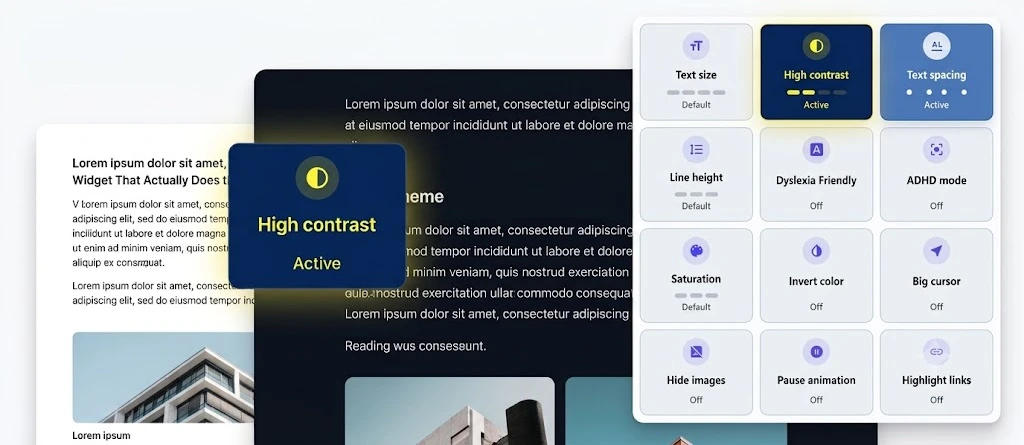

TL;DR AllyKit is a lightweight, zero-dependency JavaScript accessibility toolkit that adds 13 accessibility features to any website through a single <script> tag. It covers text scaling, high-contrast modes, dyslexia fonts, a built-in screen reader, ADHD focus mode, and more — all aligned with WCAG 2.1 guidelines and persisted across sessions via localStorage.
Most web developers know their sites could be more accessible. The contrast ratios are borderline. WCAG has been on the backlog for months. Real users with real needs are working around gaps that shouldn’t exist. AllyKit doesn’t fix the underlying markup — but it gives users a usable interface while the deeper work happens, and it does it without requiring a build step, a framework, or a single dependency.
What Is AllyKit?
AllyKit is an open-source, zero-dependency JavaScript accessibility widget that injects a floating panel into any webpage. Users open the panel and control their own accessibility preferences — text size, color contrast, font style, animation behavior, and more. Settings persist to localStorage so preferences carry across pages without users needing to re-select them.
It’s available as a plain script file, an npm package (@preepo/allykit), and via CDN through jsDelivr. One line of HTML is all the installation requires.
The 13 Features at a Glance
AllyKit ships with the following features enabled by default. Developers can disable any of them via config:
- Text scaling — four levels from 110% to 140% using CSS zoom
- High contrast — Enhanced, Black/White, Black/Yellow, and WCAG AA-compliant Dark Mode
- Text spacing — three levels up to 0.16em letter spacing and 0.32em word spacing
- Line height — three levels up to 2×
- Dyslexia-friendly font — switches to OpenDyslexic via .woff
- ADHD focus mode — a cursor-following strip that dims surrounding content
- Saturation control — Low, High, and Grayscale
- Invert colors — with hue rotation to preserve perceived color accuracy
- Big cursor — enlarged custom cursor
- Hide images — removes <img>, <picture>, and CSS backgrounds
- Pause animations — sets all animation and transition durations to near-zero
- Highlight links — outlines every <a> in high-visibility yellow
- Screen reader — Web Speech API-powered, follows the ARIA label hierarchy
How the ARIA-Based Screen Reader Works
The built-in screen reader follows the ARIA accessible name priority chain — the same order that real assistive technology uses:
| Priority | Source | Example |
| 1 | aria-label | Explicit ARIA label on the element |
| 2 | aria-labelledby | References another element’s text |
| 3 | <label for=””> | Form label associated by ID |
| 4 | alt / title | Image alt text or element title |
| 5 | placeholder / value | Input placeholder or current value |
| 6 | innerText | Visible text content of the element |
Hover announcement uses a 150ms debounce — it fires only after the cursor settles on an element, not on every pixel of movement. Tab-key focus events are checked against recent hover announcements to avoid double-announcing the same element. For link navigation, same-tab clicks are intercepted, the link text is spoken, and navigation follows (or times out after 4 seconds). External target=”_blank” links are announced but not intercepted.
Developer Integration
The JavaScript API is intentionally minimal. After initialization, the full surface looks like this:
| AllyKit.init(options) // initialize and render AllyKit.open() // open the panel AllyKit.close() // close the panel AllyKit.toggle() // toggle panel open/closed AllyKit.reset() // reset all settings and clear localStorage AllyKit.getState() // returns a plain-object copy of current state AllyKit.destroy() // fully removes AllyKit and cleans up side effects |
React integration goes inside useEffect with destroy() on cleanup. Vue uses onMounted / onUnmounted. For SSR frameworks like Next.js or Nuxt, keep init() client-side only — AllyKit renders into a Shadow DOM root and requires a real browser environment.
WCAG Coverage
| WCAG Criterion | What AllyKit Covers |
| 1.4.3 — Contrast Minimum | Four high-contrast modes including a verified WCAG AA dark mode |
| 1.4.4 — Resize Text | Four scaling steps up to 140% without loss of functionality |
| 1.4.12 — Text Spacing | Spacing levels match the WCAG-specified adjustment ranges |
| 2.3.1 / 2.3.3 — Animation | Pause Animations addresses both flash threshold and motion-triggered animation |
| 4.1.2 — Name, Role, Value | Screen reader follows the accessible name computation spec |
Quick Start
| <!– Add before </body> –> <script src=”https://cdn.jsdelivr.net/npm/@preepo/allykit/ally-kit-min.js”></script> |
Or via npm: npm install @preepo/allykit
Github Repo: pritush/ally-kit: easy to install accessibility Widget for website
Frequently Asked Questions
Does AllyKit make a website fully WCAG compliant?
No — and it doesn’t claim to. Full WCAG conformance requires accessible markup, semantic structure, keyboard navigation, and proper ARIA implementation throughout the codebase. AllyKit adds user-controlled accessibility tools at the browser layer, which covers a meaningful subset of WCAG criteria but not all of them.
Does it work with React and Vue?
Yes. Initialize inside useEffect (React) or onMounted (Vue), and call destroy() on component unmount.
Can I disable specific features?
Yes. Any feature key can be set to false in the config, and it won’t appear in the panel at all.
What browsers does it support?
Chrome 88+, Firefox 85+, Safari 14+, Opera 74+. No polyfills, no dependencies.